Posts
Showing posts with the label Continuous Integration
Poka-Yoke - Continuous Improvement Technique
- Get link
- X
- Other Apps
Poka-Yoke is a device or method that prevents people from making mistakes. The word in Japanese means mistake proofing or error proofing. What habits we can have in Scrum Sprints: 1. PO must have this constant habit of thinking "Is this User story solving the problem"? 2. Developers must do code check-in when all the team members are there. This will create a stable build. 3. Scrum Master need to constantly think of not only current sprint status but also about next sprint risks/dependencies. 4. QA must have a habit of checking the software on every code check-in and not when all the features are available. If any logical feature/test case is finished QA should start verifying it. 5. QA must interact with Dev on regular basis to share the observations. Bugs reported much early in the sprint cycle is better than later. Can someone think of any other habits?
8 Benefits of Unit Testing
- Get link
- X
- Other Apps
Programming with Confidence: unit tests increase your confidence about the code you are developing because the tests will clearly show if the changes you made caused the failure of some part of your code. This way you can fix the code, run the tests again, and if all pass, you can continue to work with the confidence that everything is still working properly. Continuous Integration of Code: unit testing ensures that the new features developed didn’t cause side effects on the code that was already working, so you have more confidence that the new features developed are working properly and also that they did not harm other parts of the software that previously had been already checked and perhaps even validated. Better confidence on the quality of your code: with unit testing, you are not only supposing that your code is working, but instead you are sure about it , because when all your tests are passing you know that your system is behaving e...
Continuous Delivery - An Example
- Get link
- X
- Other Apps
An example of an idealized, modern software delivery pipeline might look like the following: • Plan user stories and manage issues with a project management tool like JIRA. • Collaborate on code via GitHub pull requests or a code review tool. • Kick off a build in a CI system like Jenkins or Bamboo. • Automatically run unit and functional tests with open source testing tools like xUnit and other testing frameworks, and automation tools like Selenium and Appium. • Deploy with an IT automation tool like Puppet or Chef, or using a PaaS. • Monitor performance and impact on business metrics with systems like New Relic and Mixpanel.
Set Up Continuous Integration with Team Foundation Server
- Get link
- X
- Other Apps
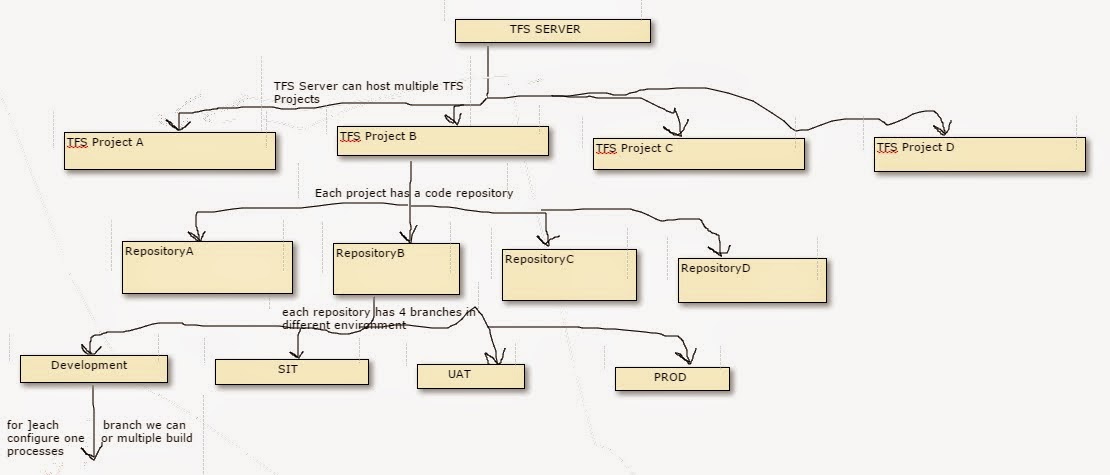
TFS infrastucture For PROD, you may like to have Nightly Builds, for Development you want to have a build triggered at every check-in and so on… These builds require a build server. You can use 1 build server for all the builds or you can have a separate build server for each Repository, or you can share build server between 2 repositories. The decision to use one-build server or more depends on the peak-load, expected build queue, h/w infrastructure and a lot of other parameters. If you do not want build services, you do not need to configure a build server at all. http://www.codetails.com/2013/11/23/team-foundation-server-understanding-the-architecture/ Set Up a Dedicated Build Server Installs the build service on the team's build server Set Up the Drop Folders A folder where the Team Foundation build service can drop the builds. Give the folder permissions to the server that runs the build service Create the Continuous-Integ...